lamindb  

Data management for traceable, multimodal AI.
If you just want to read data from a LaminDB instance, use DB:
import lamindb as ln

db = ln.DB("laminlabs/cellxgene")
To write data, connect to a writable instance in a development directory:
lamin login
cd myproject
lamin connect --here account/myproject
You can create an instance at lamin.ai and invite collaborators. If you prefer to work with a local database (no login required), run:
mkdir myproject && cd myproject && lamin init
LaminDB will then auto-connect upon import and you can create & save objects like this:
import lamindb as ln
# → connected lamindb: account/instance

ln.Artifact("./my_dataset.csv", key="datasets/my_dataset.csv").save()
Lineage
Track inputs, outputs, parameters, and environments of scripts, notebooks, and workflows.
For tracking agents, see the CLI command lamin track.
|
Track a run of a notebook or script. |
|
Finish the run of a notebook or script. |
|
Use |
|
Use |
Artifacts & collections
The central Artifact registry holds files, folders & arrays across any number of storage locations.
The Collection registry holds versioned collections of artifacts and allows, e.g.,
to construct big sharded datasets across many parquet files or zarr stores.
|
Datasets & models stored as files, folders, or arrays. |
Versioned collections of artifacts, such as sharded datasets across many parquet files or zarr stores. |
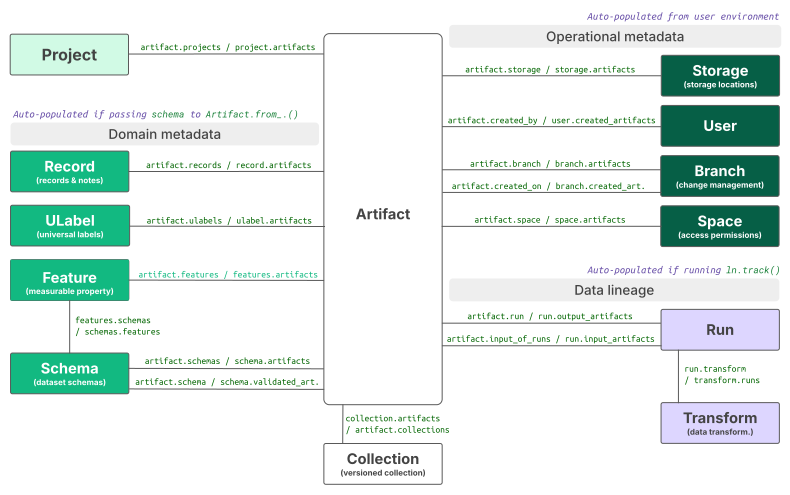
All other registries link to Artifact to provide context for finding, querying, validating, and managing artifacts.
Here is an overview of the core data model:
Transforms & runs
Data transformations and their executions.
Data transformations such as scripts, notebooks, functions, or pipelines. |
|
|
Runs of transforms such as the executions of a script. |
Records, labels, features & schemas
Manage flexible records, e.g., for samples or donors, and create simple labels.
|
Structured records with support for notes. |
|
Simple labels. |
Define features & schemas to validate artifacts & records.
|
Measurable properties such as the columns of a |
|
Schemas to impose structure on artifacts and records. |
Managing operations
|
Projects to label artifacts, transforms, records, and runs. |
|
Storage locations of artifacts such as local directories or S3 buckets. |
|
Users. |
|
Branches for change management with archive and trash states. |
|
Spaces for access permissions. |
References such as internal studies, papers, documents, or URLs. |
Basic utilities
Connecting, viewing database content, accessing settings & run context.
|
Query any registry of any instance. |
|
Connect the default database. |
|
View metadata. |
|
Bulk save objects. |
|
Path-like access to files. |
Global live settings ( |
|
Global run context ( |
Curators and integrations
Curators. |
|
Integrations. |
Examples, errors & setup
Examples. |
|
Errors. |
|
Setup & configure LaminDB. |
Developer API
Base library. |
|
Core library. |
|
Auxiliary models & database library. |